Combinatorial Data Generation

The release is centered on one theme: faster paths from existing data to realistic, constrained, exportable test sets.
This release adds broader combinatorial generation, schema authoring improvements, safe-by-default Faker helper controls across interfaces, better import/export controls, and a few high-value grid usability upgrades.
1. N-wise combinatorial generation, not just pairwise
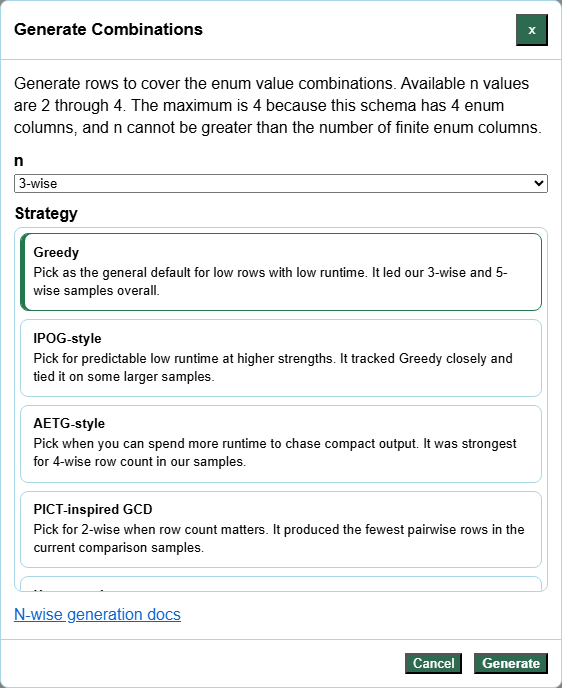
The biggest addition is that combinatorial generation now goes beyond pairwise.
Instead of stopping at 2-wise coverage, you can now choose stronger coverage levels for enum-driven schemas and compare strategies before generating.
Example schema:
Browser: Chrome,Firefox,Safari
Device: Desktop,Tablet,Mobile
Locale: en-GB,en-US,fr-FR
Theme: Light,Dark
With this schema you can choose:
2-wiseto cover every pair of enum values3-wiseto cover every triplet- stronger levels when you need more interaction coverage
This is especially useful when pairwise is too light, but full Cartesian generation would explode the row count.
Docs:
2. Schema constraints with PICT-style IF ... THEN ...
Schema constraints make generated combinations more realistic by filtering out invalid rows.
Example:
Priority
enum("High","Medium","Low")
Status
enum("Open","Queued","Closed")
Escalated
enum("Yes","No")

IF [Priority] = "High" THEN [Status] = "Open";
IF [Priority] IN {"High","Medium"} THEN [Escalated] = "Yes";
This means:
- high-priority items must be open
- high and medium priorities must be escalated
Constraints work well with enum-heavy decision tables and combinatorial generation, giving you more realistic output without manually cleaning results afterward.
Docs:
3. Grid to Enum Schema for turning existing tables into generators
If you already have representative data in the main grid, you can now turn that grid into an enum schema automatically.
Example grid:
Browser,Device,Theme
Chrome,Desktop,Light
Firefox,Mobile,Dark
Chrome,Tablet,Dark
Generated schema:
Browser
enum("Chrome","Firefox")
Device
enum("Desktop","Mobile","Tablet")
Theme
enum("Light","Dark")
This is one of the most practical workflow improvements in the release because it shortens the path from imported examples to reusable generation rules.
Docs:

4. PICT-style inline enum definitions such as Name: values
Schema text now fits more naturally with compact PICT-style authoring.
Example:
Browser: Chrome,Firefox,Safari
Theme: Light,Dark
Priority: enum("High","Medium","Low")
Owner: person.fullName
That means you can mix:
- raw inline enum values
- explicit
enum(...) - other command-based field definitions
This makes it easier to paste or adapt schemas from existing combinatorial models instead of rewriting them into a stricter two-line format.
Docs:
5. Import trimming controls for cleaner amend and import workflows
Imported files and clipboard data can now be normalized during import.
You can trim:
- every imported field value
- only selected fields
Example selected fields list:
Name, Email
This helps when imported files contain accidental whitespace around values, but you do not want to aggressively rewrite every column.
Docs:

6. File export settings for line endings and BOM
Downloads now support file transport settings without changing the preview text shown in the browser.
You can configure:
LForWindows (CR/LF)line endings- optional UTF-8
BOM
This is useful when exporting for spreadsheets, Windows tooling, or downstream systems that are sensitive to file encoding details.
Docs:

7. Right-click context menu in the main data grid
The editable grid now has a right-click context menu for common grid actions.
This keeps more of the workflow close to the current selection and makes the app feel more like a direct data-work surface rather than a form with a grid attached to it.
Docs:
8. Always-visible total row counts in the data grid
The main grid now shows total row counts, and filtered views also show how many rows remain visible.
Examples:
Total rows: 125
Total rows: 125 | Filtered Visible: 12
It is a small change, but it removes friction during import checks, filtered analysis, and post-generation review.
Docs:
Why should you care?
Taken together, these features make the tool better at moving through the whole workflow:
- start with imported or hand-edited data
- convert it into a schema
- add constraints
- enable unsafe Faker helper expressions only when the schema is trusted
- generate the right amount of combinatorial coverage
- export in the format and file encoding you actually need
The release adds more generation power, reduces setup time, and cleanup time around that generation.